Changes and new designs may often be incorporated without reprogramming

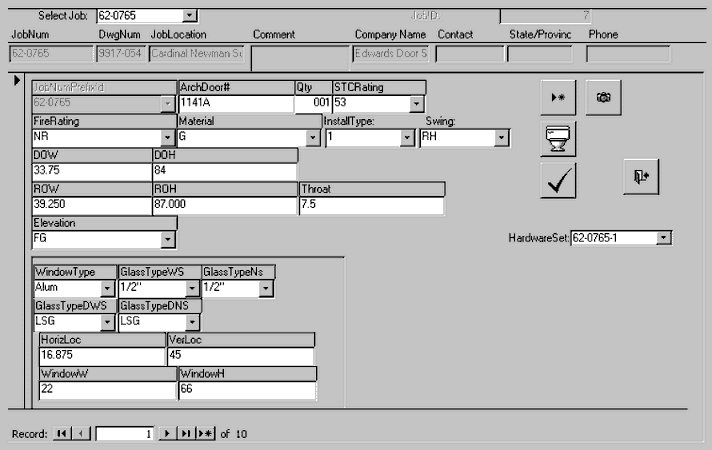
Where practical, the customer’s data and business rules are stored as data, not as program code.  Changes and new designs may often be incorporated without reprogramming.  For example, the options for each of the doors’ properties are stored as data base tables.  In the form above, these would include the STC Rating (the level of sound insulation provided), fire rating, material, installation type, swing and elevation types.  Selections may be made by pointing, or by typing just enough characters to uniquely identify the desired option.  Misspellings and other data entry mistakes are eliminated.

Rules defining permissible combinations and relationships are stored as data

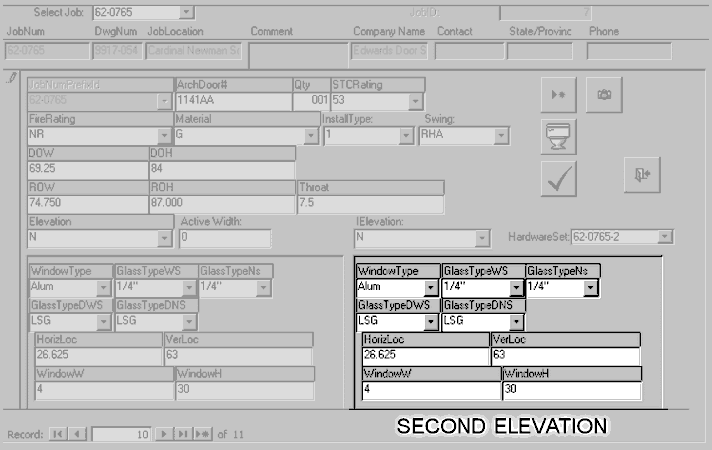
Notice how a second elevation section has appeared (below) for the dual leaf door

Rules defining permissible combinations and relationships are stored as data as well.  The selection of a certain fire rating may limit the material choices and the size of the window, for example.  This built in expertise has proven useful in the specification phase of the engineering cycle, which was not even a target of this automation project.

In the customer’s coding system, a door like the one shown above with a swing of RH is a single leaf, right handed door.  A swing of RHA, as in the following example, indicates a dual leaf door with right hand swing active.

Notice how a second elevation section has appeared for the dual leaf door.  The two leafs of a dual leaf door are assumed to be symmetrical in width, but this can be over-ridden with an entry in the active width box which appears when a dual leaf style is selected.

Each Job may have any number of hardware sets associated with it.

Default values which are correct except in rare instances are automatically calculated for Rough Opening Width and Height (ROW, ROH) based on Door Opening Width and Height (DOW, DOH). Decimal and fractional entry is supported for numerical quantities, as are mixed calculations (12+1/3+3/32-2.5).

HARDWARE SETS and DETAILS
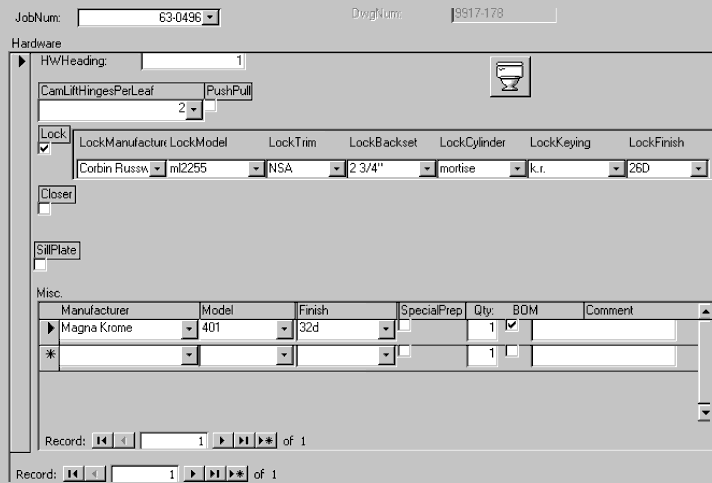
Each Job may have any number of hardware sets associated with it.  Hardware set definition is done with the following form:

If an item is entered that was not encountered before, the system asks if it should be added to the underlying table.

In the example, a lock is selected, and the details of the lock are shown.  Neither a closer nor sill plate is selected, and therefore those detail sections are hidden.  All of the options for all of the properties of all of the hardware items are stored in data base tables, and can therefore be entered by pointing or typing shorthand. If an item is entered that is not encountered before, the system asks if it should be added to the underlying table, and does so automatically if the answer is yes.

Each hardware set can have any number of miscellaneous items.